
Understanding ‘site registration’ and ‘course enrollment’ #
Site registration, also known as the authentication method, is the process of creating a user account or profile.
On the other hand, course enrollment is the process by which a user gains access to a course and its content. In ScholarLMS, the terms ‘enroll’ or ‘enrollment’ are always used in relation to course enrollments. It’s important to note that a user account must already exist before a course enrollment can occur.
Types of Enrollment Methods #
There are several ways a user can be enrolled in a course, in this section let’s explore the most common ways.
1) Manual Enrollment
In Manual Enrollment, an admin or instructor enrolls users in a course manually. They navigate to the course, search for the desired user, and enroll them in the course. Explore how to manually enroll user in a course →
2) Enrollment through a purchase
Users are automatically enrolled in a course after purchasing either a single course or a course bundle. Explore how eCommerce enrollment works →
3) CSV file bulk enrollment
Administrators have the option to bulk enroll users in a course by a CSV file. Explore how it works →
4) Self Enrollment
Allows students to self-enroll them in a course. Explore how it works →
5) Guest Access
When enabled, this feature allows users to access a course content as guests without a user account. Explore how to enable guest access →
6) Cohort Sync
This method automatically enrolls users within a cohort into the courses it is synced with. Explore how it works →
Enable/disable Enrollment Methods at site-wide level #
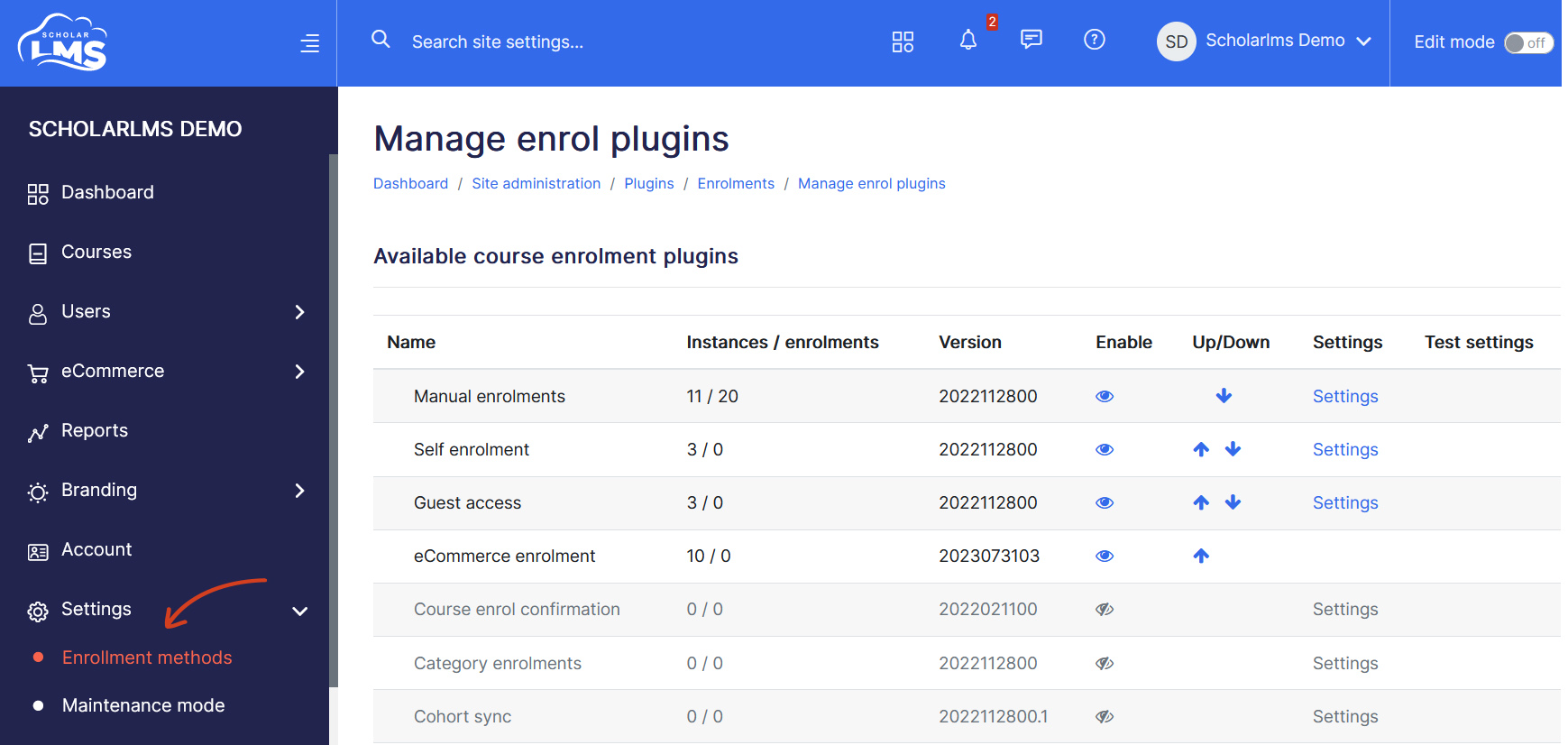
The site comes with few Enrollment Methods enabled at site-wide level. To enable/disable an enrollment method:
- Navigate to Settings->Enrollment Methods from left navigation.
- Click icon to disable. and to enable an enrollment method.
Warning! Disabling an enrollment method may result in the loss of access for all users who were enrolled through that method. For example, if you disable Manual Enrollment, all users (at site-wide level) who were manually enrolled will lose access.